Must-have iPad 2 Apps (Part 2)


One of the most powerful evidence given by Apple is to say iOS is better than Android is that it has much more apps. Of course it’s true; Apple iOS has so many apps that we users don’t even know which is better. So a lot of these kinds of suggestions are emerging online.

After Steve Jobs announced the iPad 2 in March and release a week later, iPad 2 surely becomes and remains the most popular tablet in the market. In the following few months, all kinds of tablets comes out, some even boast as “iPad killer”, but none of them really matches iPad 2. Here I’d share some must-have iPad 2 apps that I use which I think they could be universally needed by all of you.

1. iMovie

The iMovie should be the equivalence of Windows Movie Maker on iPhone 4, iPod Touch and the amazing iPad 2. It is designed for multi-touch screens, so with iMovie, we could easily make a movie in minutes by adding photos, music, video and effects with our fingers.
iMovie

2. PhotoBooth

PhotoBooth is originally designed for Mac and now Apple has made if off Mac and embedded in iPad 2. What could it do? Interesting. It could edit or warp the photos to your pleasure. Besides the preset effects, you could also create eight “new” versions of your picture. Use the front-facing camera so that you could see your own photo when taking the headshot.
PhotoBooth

3. Phototogene

Photogene is about improving your digital photos and having fun while at it. This intuitive, easy to use application offers a comprehensive set of professional editing tools to Crop, straighten and many other features has included.
Phototogene

4. Urbanspoon

Can’t decide where to eat? Urbanspoon can help. Specifically designed for the iPad, Urbanspoon can show you all the restaurants in your city at the same time. You’ve never seen anything like it.
Urbanspoon

5. Twitter

Another app that has been updated to take advantage of the iPad 2’s cameras. Twitter’s official app is not to everyone’s taste but I think it’s well designed and easy to use. The ability to take a snapshot from within the app is a handy tweak.
Twitter

6. FaceTime

This app was firstly used on iPhone 4 version. Here you get to add your friends name to your favorites list and then you will be able to video call them. You can also switch between the front and rear-facing cameras during a call.this would be one of the interesting and fresh apps for your iPad2.
FaceTime


Free Labor Day 2011 PowerPoint Templates Download

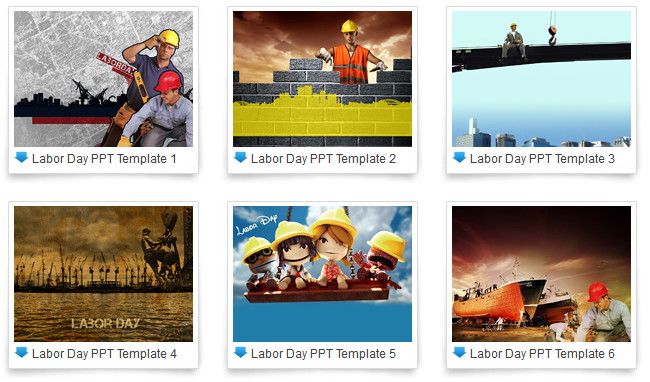
Labor Day 2011 is on corner, at this final weekend before the summer and back to school season ends, here we collect these Labor Day PowerPoint templates for free download. Hope you have a happy Labor Day 2011 weekend!

Labor Day PowerPoint Template 1

Labor Day PowerPoint Template 1

Labor Day PowerPoint Template 2

Labor Day PowerPoint Template 2

Labor Day PowerPoint Template 3
 Labor Day PowerPoint Template 3

Labor Day PowerPoint Template 4

Labor Day PowerPoint Template 4

Labor Day PowerPoint Template 5
 Labor Day PowerPoint Template 5

  For more free Labor Day PowerPoint templates, you may download it here:
free Labor Day PowerPoint templates

Free download PowerPoint background:

How to Convert PowerPoint to Blackberry Torch 9800

Ever after Blackberry Torch 9800 released on in August last year, it has become one of Blackberry’s most popular Smartphones. Blackberry has quite huge reputation among business users for its gorgeous email support and the revolutionary full QWERTY physical keyboard. Blackberry Torch 9800 again marks a milestone for RIM. It perfectly integrated the full keyboard and the currently popular touch screen together with a slide-out design. This change enables Blackberry Torch 9800 to adopt a bigger 3.2-inch touch screen (The same Smartphone released last year, iPhone 4 has 3.5-inch screen). So it will be awesome to play video on Blackberry Torch 9800 but due to the various formats, users may come across such problem that a certain video format could not be supported. This could be easily solved by converting to a Blackberry Torch 9800 favored video format.

As we said, for business users, you may need to view PowerPoint a lot. How to realize to play PowerPoint on blackberry 9800? Since PowerPoint files are not initially supported, we need to convert it to other formats.

The following 3 methods will enable you to watch PowerPoint on Blackberry Torch 9800.

Method 1: Save PPT as video

The benefit of converting PPT to video is that all the original PowerPoint elements could be preserved, such as animations, transitions, music, video, fonts and languages, etc.
PPT to Video Converter

Step 1: Import PowerPoint files. Click “Add” on the interface.

Step 2: Customize the output video format. Click “Settings” to choose a Blackberry Torch 9800 friendly video format and then adjust the video and audio parameters for better effects.

Step 3: Convert. Click “Start” button to convert.

With the shortest time, you could transfer the exported PowerPoint video to Blackberry Torch 9800 for viewing whenever you want.

Method 2: Save PPT as PDF

This is a good way for PDF format is widely supported and a PDF file has small size. However, the dynamic effects of the PowerPoint like animations, transitions, music and video clips will be deleted. This free PPT to PDF converter could help.

Method 3: View PowerPoint online

Although most websites don’t allow users to upload PowerPoint formats but some do. For example, Slideshare.net, you can upload PPT to this website so that you can view PowerPoint on Blackberry Torch 9800 anywhere unless you have network available.

For Android Smartphones, you could also play PowerPoint by installing Office apps. But Blackberry Torch 9800 cannot, for it is running on a different operating system, Blackberry OS 6. Hope that one day Microsoft PowerPoint could be supported by all Smartphones then we don’t need to worry anymore.